Property Management Software
How to Create a Rent Roll (and Why Every Landlord Needs One)
Mocha Manage•November 3, 2026
If you had to hand someone a single document that captured the financial health of your rental property, it would be the rent roll.
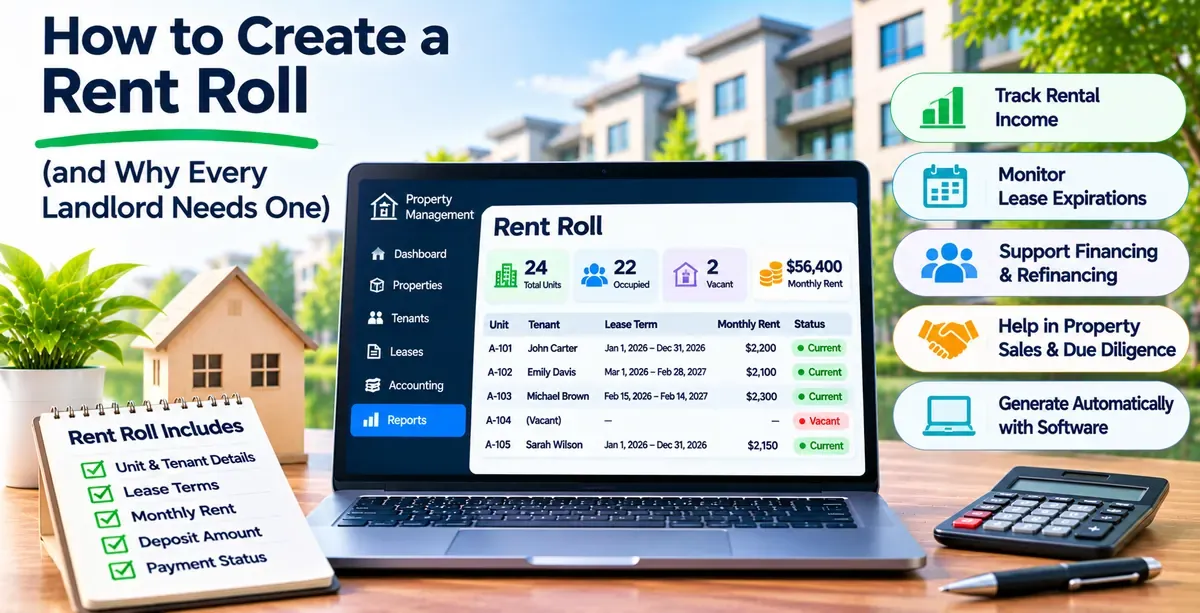
A rent roll is an itemized report of the income generated by a rental property or portfolio, along with the tenant and lease details behind that income. In one view, it shows who's renting each unit, how much they pay, when their leases start and end, and whether they're current on rent.
Think of it as a snapshot. At any moment, the rent roll tells you the state of your rental income: what should be coming in, what has come in, and what's outstanding. That snapshot is why it's one of the most relied-upon documents in real estate, used not just by landlords and managers but by lenders, investors, and buyers.
This guide covers what a rent roll includes, why it matters, how it differs from similar documents, and how to create and maintain one.
A rent roll can be simple or detailed, but a complete one captures the information needed to understand a property's rental income at a glance.
At its core, a rent roll lists each unit and its tenant, the lease terms, the rent, and the payment status. More detailed versions add unit characteristics (square footage, bedrooms and bathrooms), deposit amounts, rent increase history, and lease expiration tracking.
The right level of detail depends on who's using it. A landlord managing day-to-day operations might keep it lean. A rent roll prepared for a lender or buyer during a sale usually includes more, since those parties are scrutinizing the property's income and stability.
The rent roll earns its importance by serving several audiences at once. Each uses it differently.
For the people running the property, the rent roll is an operational tool. It gives a quick read on cash flow: who has paid, who hasn't, and how much is outstanding. It surfaces vacancies, flags upcoming lease expirations so you can start renewals early, and helps identify underperforming units. Over time, it reveals turnover and renewal patterns and shows how rents are growing year over year.
When you apply for financing or refinancing on a rental property, the lender will almost always ask for a rent roll. It gives them a clear picture of the property's income and cash flow, which they use to assess the loan and set terms. A clean, accurate rent roll supports a smoother financing process.
In a sale, the rent roll is central to due diligence. Buyers use it to verify the property's income, assess its stability, and judge its value and potential return. A well-maintained rent roll is supporting evidence of what the property actually earns, which makes it more marketable. A messy or unreliable one raises questions that can slow or sink a deal.
The rent roll is often confused with other reports it resembles. The differences matter.
A rent roll focuses on rental income and tenant details. A profit and loss statement covers the property's full financial performance, including expenses. The rent roll tells you what's coming in; the P&L tells you what's left after costs. They complement each other.
A lease ledger records every financial transaction tied to a lease over time (every charge, payment, and credit). A rent roll is more of a static snapshot of the current tenancy and rent situation at a point in time. The ledger is the running history; the rent roll is the current picture.
You have two practical options for creating a rent roll, and the right one depends mostly on the size of your portfolio and the tools you already use:
Both produce the same document. The difference is how much ongoing work it takes to keep that document accurate, which is where the two paths diverge sharply as your portfolio grows. Here's how each one works.
A landlord with a few units can create a rent roll from scratch in a spreadsheet like Excel or Google Sheets. Set up a column for each piece of information you want to track (unit, tenant name, lease start and end dates, monthly rent, deposit, and payment status), then fill in one row per unit. Add a totals row at the bottom to sum your monthly rent and see your gross rental income at a glance.
The appeal is that it's free, familiar, and fully customizable. You can add columns for anything you want to track, sort and filter however you like, and it works without any special software. For a landlord with a handful of doors, a spreadsheet rent roll is a perfectly reasonable starting point.
The catch is maintenance. The truth is, a rent roll is only useful if it's accurate, which means updating it every time rent is collected, a lease changes, a tenant moves out, or a new one moves in. For a small portfolio that's manageable. As the portfolio grows, keeping a manual rent roll current becomes a real chore, and an error-prone one: a missed update or a mistyped figure can quietly make the whole document wrong, which is a problem when a lender or buyer is relying on it.
Property management software generates a rent roll automatically from your existing records. Because the software already holds your lease terms and payment data, it can produce a current rent roll on demand, usually with a click, and often filtered by property, date range, or owner. There's nothing to build and nothing to fill in by hand.
The advantage is that it's always current and tied directly to your accounting. There's no separate document to maintain, no manual updating, and no risk of the rent roll drifting out of sync with reality. When a payment posts or a lease changes, the rent roll reflects it automatically. That also means the income figures on the rent roll match your books, which matters when someone scrutinizes them during financing or a sale.
For anyone managing more than a handful of units, this is the option that saves real time and prevents the accuracy problems that creep into manual tracking. The rent roll stops being a document you maintain and becomes a report you generate whenever you need it.
A rent roll is only as good as the data behind it. When that data lives in a spreadsheet you have to update by hand, the rent roll is always slightly out of date and one typo away from wrong.
Mocha Manage generates your rent roll from live data, tied directly to CPA-grade accounting. Because rent charges, payments, and lease terms all live in one system, the rent roll reflects the current reality without any manual updating.
Here's what that means in practice:
The result is a rent roll you can trust and produce instantly, whether you're checking cash flow on a Tuesday or handing due-diligence documents to a buyer.
Try Mocha Manage free to see how a real-time rent roll works when it's tied to your accounting.
What is a rent roll?
A rent roll is an itemized report of the rental income and tenant details for a property or portfolio. It shows who's renting each unit, how much they pay, their lease terms, and their payment status, giving a snapshot of the property's rental income.
What should a rent roll include?
At minimum: unit identifier, tenant name, lease start and end dates, monthly rent, and payment status. More detailed rent rolls add square footage, bedrooms and bathrooms, deposit amounts, rent increase history, and occupancy status.
Why do lenders ask for a rent roll?
Lenders use the rent roll to verify a property's rental income and cash flow when evaluating a loan or refinance. A clear, accurate rent roll gives them the picture they need to assess the property and set loan terms.
What's the difference between a rent roll and a P&L?
A rent roll focuses on rental income and tenant details. A profit and loss statement covers full financial performance, including expenses. The rent roll shows what's coming in; the P&L shows what's left after costs.
How often should a rent roll be updated?
Whenever rent is collected, a lease changes, or a unit turns over. A rent roll is only useful if it's current. Property management software keeps it updated automatically; a manual spreadsheet requires updating by hand each time something changes.
Can I create a rent roll in Excel?
Yes. A landlord with a few units can build one in a spreadsheet with columns for unit, tenant, lease dates, rent, and payment status. The challenge is keeping it current as the portfolio grows, which is where software that generates it automatically helps.
Disclosure: Mocha Manage publishes this blog. This guide is for informational purposes only and does not constitute financial or accounting advice. Consult a professional familiar with property management for advice specific to your situation.