Effortless Invoicing with
Mocha QuickBill
QuickBill’s Invoicing feature is designed to simplify how invoices are created and managed. From automated invoice generation to one-click dispatch, QuickBill ensures your billing process runs smoothly — no manual work, no errors, just effortless billing.

Key Invoicing Features with Mocha QuickBill
Smart Invoice Creation
Generate professional invoices in seconds. Auto-populate customer, pricing, and tax details. Apply discounts, credits, and custom fields with ease. Multi-currency and multi-language support for global clients.
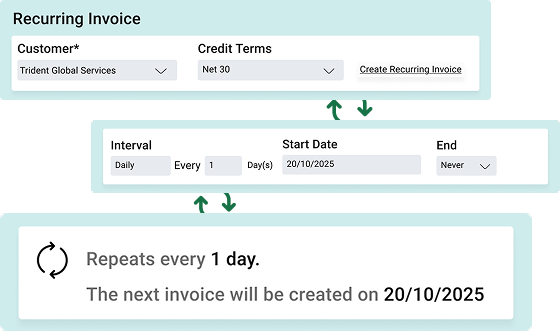
Automated Recurring Billing
Never miss a billing cycle again. Set up recurring invoices for subscriptions and retainers. Automatically send reminders and renewals.
Real-Time Tracking & Status Updates
Know the moment your client views, approves, or pays your invoice. Track invoice delivery and read status. Send smart reminders for overdue payments. Get a clear view of pending, paid, and disputed invoices in one dashboard.
Integrated Payments
Turn invoices into cash faster. Accept online payments via cards, UPI, or bank transfers. Automatically reconcile payments with the accounting system.

Simplify Every Step From Draft to Payment
With Mocha QuickBill, invoicing is not just faster — it’s smarter. Automate repetitive steps, eliminate manual errors, and gain complete visibility into every invoice you send.
Mocha QuickBill Works Seamlessly with

Subscription Billing
Auto-generate invoices for recurring plans

Customer Management
Sync customer contact and billing details instantly

Revenue Reports
Track earnings and cash flow in real time
What Our Clients Have to Say

Mocha Accounting Software is easy to learn and simple to use and has more functionalities than other software in the market. I switched from QuickBooks for my business, and I don't see myself using another accounting software again.

Mocha is intuitive and user-friendly, making tasks like invoicing, expense tracking, and financial reporting much simpler. It not only saves time by reducing human error but also improves the reliability of Financial Reporting.

Mocha Accounting is modular, easy-to-use accounting software. It offers everything its competitors offer, but beyond that, Mocha's USP is the customisation they can offer to match your industry and business's custom requirements.
Frequently Asked Questions
It handles creating and managing invoices, from generating them automatically to sending them in one click, so there's no manual work in the billing process.
In seconds. QuickBill fills in the customer, pricing and tax details for you, so you don't type them for each invoice.
Yes. You can apply discounts and credits and add custom fields when you create an invoice.
Yes. You can set up recurring invoices for subscriptions and retainers. QuickBill also sends reminders and renewal notices for you, so no billing cycle is missed.
Yes. QuickBill shows when an invoice is delivered, viewed, approved or paid. One dashboard shows which invoices are pending, paid or disputed.
QuickBill sends smart reminders for overdue payments, so you don't have to chase clients by hand.
Customers can pay online by card, UPI or bank transfer. Payments are matched to your accounting system automatically.