Discounts That Drive Growth
Create and manage discount coupons for your customers in seconds — set the code, the discount, how long it runs and share it with your customers so that they can apply it at billing to win more sign-ups and renewals for your business.

Key Coupon Management Features with Mocha QuickBill
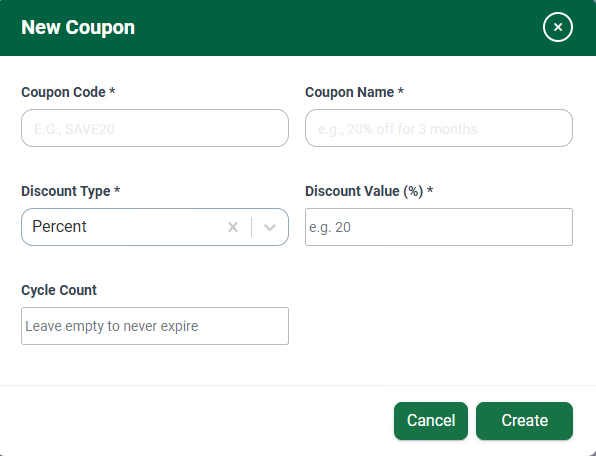
Create a Coupon in Seconds
Give it a code and a friendly name, choose the discount type and value, and you're done. A clean, no-fuss form means anyone on your team can spin up a new offer in moments — no developer required.
Set the Discount and the Duration
Offer a percentage or a flat-amount discount, then set a cycle count so it applies for a fixed number of billing cycles — say, 20% off for 3 months — or leave it empty so the coupon never expires. You decide the deal and exactly how long it runs.
Every Coupon in One Place
See all your coupons in a single list — code, name, discount, cycles and status at a glance — and search to find any one of them instantly, however many offers you're running.
Activate, Edit or Retire Anytime
Each coupon shows its live status and can be edited in a click, so you stay fully in control of which offers are running and can adjust or wind them down whenever you need to.
SAVE20
20% off for 3 months
SSM-HUF-PUR
50% off
Launch Your Next Offer in Minutes
Create a coupon, set the discount and duration, and start converting more customers — right from your billing dashboard.
Why Businesses Choose Mocha QuickBill?

Flexible Discounts
Percentage or flat-amount discounts for the cycles you choose

Full Control
Create, edit, activate and track every coupon in one place

Drive Conversions
The right offer, applied automatically at billing
What Our Clients Have to Say

Mocha Accounting Software is easy to learn and simple to use and has more functionalities than other software in the market. I switched from QuickBooks for my business, and I don't see myself using another accounting software again.

Mocha is intuitive and user-friendly, making tasks like invoicing, expense tracking, and financial reporting much simpler. It not only saves time by reducing human error but also improves the reliability of Financial Reporting.

Mocha Accounting is modular, easy-to-use accounting software. It offers everything its competitors offer, but beyond that, Mocha's USP is the customisation they can offer to match your industry and business's custom requirements.
Frequently Asked Questions
It lets you create and manage discount coupons that customers apply at billing, which helps you win more sign-ups and renewals.
Enter a coupon code and a name, pick the discount type, and enter the discount value. Anyone on your team can do it; no developer is needed.
A percentage discount, such as 20% off, or a fixed-amount discount.
Yes. Set a cycle count so the discount runs for a fixed number of billing cycles. For example, "SAVE20" could give 20% off for 3 billing cycles.
Yes. Leave the cycle count empty and the coupon has no end date.
All coupons appear in one list showing code, name, discount, cycles and status. You can search the list to find any coupon instantly.
Yes. Each coupon shows whether it's live. You can edit it in one click, or adjust it or retire it whenever you want.
The customer applies the code you shared at billing, and QuickBill applies the discount automatically for the cycles you set.