GSTR-2B for Housing Societies & Property Managers — Reconcile Vendor ITC & File GSTR-3B with Confidence
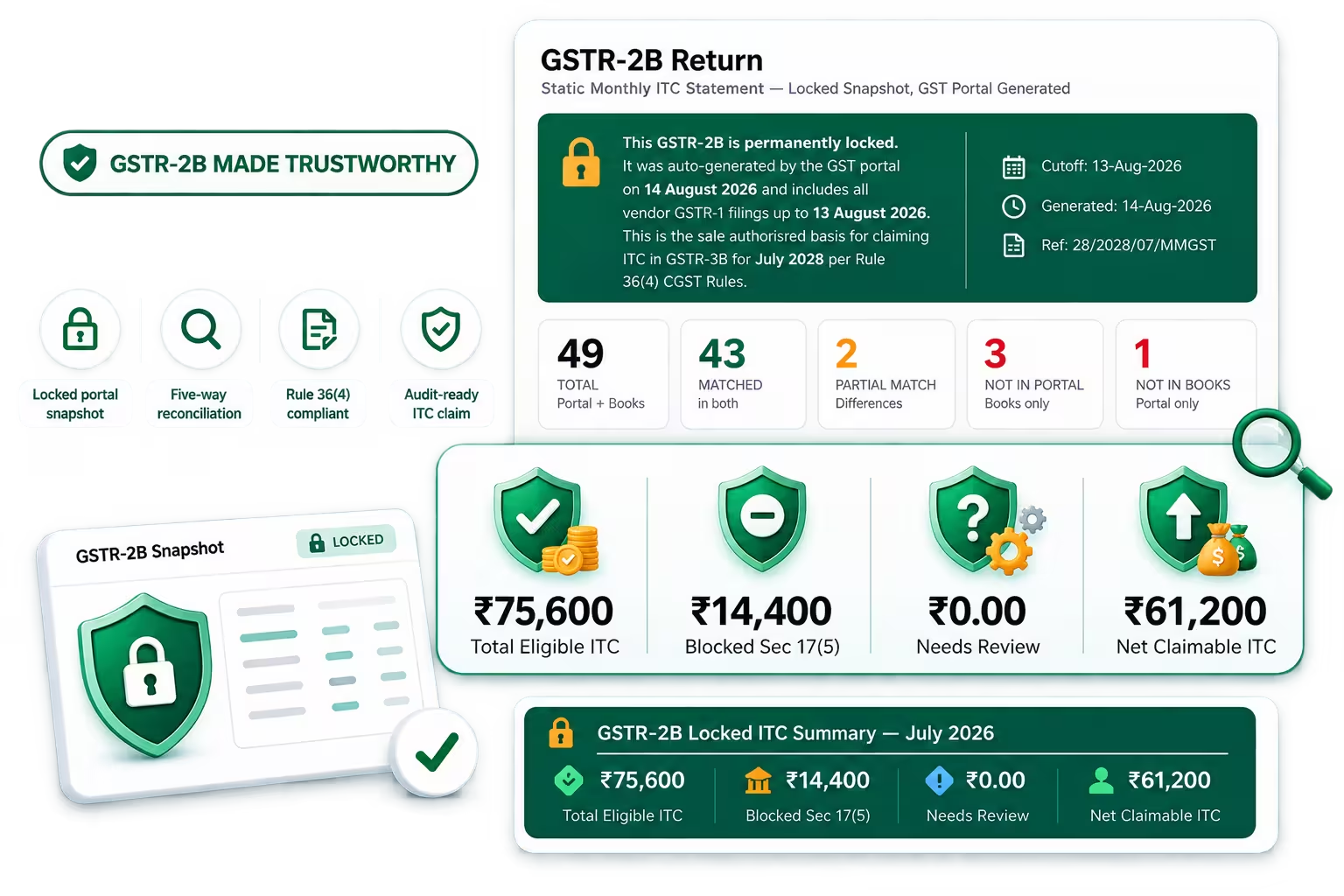
Mocha Manage imports your GSTR-2B and performs a five-way match against your vendor bills, identifies blocked credits and Rule 42 reversals on mixed-use property expenses, and feeds a verified ITC figure into your GSTR-3B — so your committee files with full visibility and zero guesswork.

Shortlist 2024

Front Runners 2024

Category Leaders 2022

Leader Spring 2024

Users Love Us

We meet the highest security standards
Features of GSTR-2B Reconciliation in Mocha Manage
Five-Way Match Against Your Vendor Bills — AMC, Security, Housekeeping and Capital Works
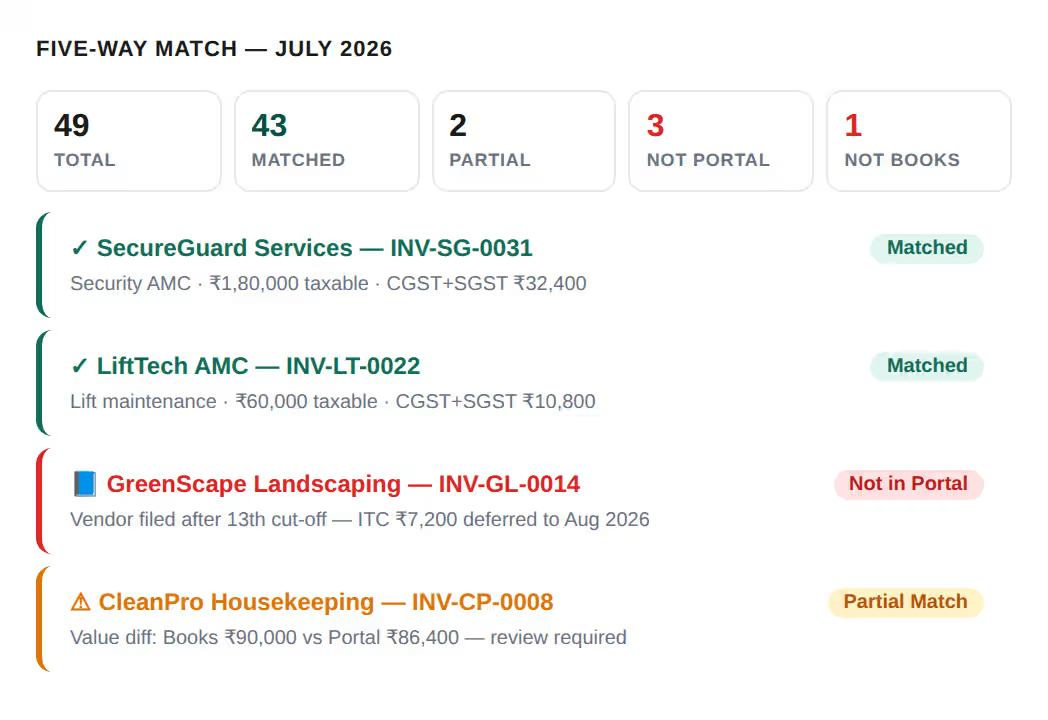
Mocha Manage imports your GSTR-2B JSON and immediately matches every vendor invoice against your vendor bill register across five categories. Matched invoices — present in both your records and GSTR-2B — are your confirmed, claimable ITC for the period. Partial Match invoices show minor value differences between what you recorded and what your vendor reported in GSTR-1. Not in Portal (books only) means the vendor filed their GSTR-1 after the 13th cut-off — ITC is deferred to the following month. Not in Books means the invoice is in GSTR-2B but not in your vendor register. This five-way match runs automatically across all vendor categories: recurring AMC contracts, monthly security and housekeeping bills, one-time capital works invoices, and any other GST-registered vendor service your property uses.
Section 17(5) Hard-Blocked and Needs-Review Credits — Separated and Flagged Before GSTR-3B
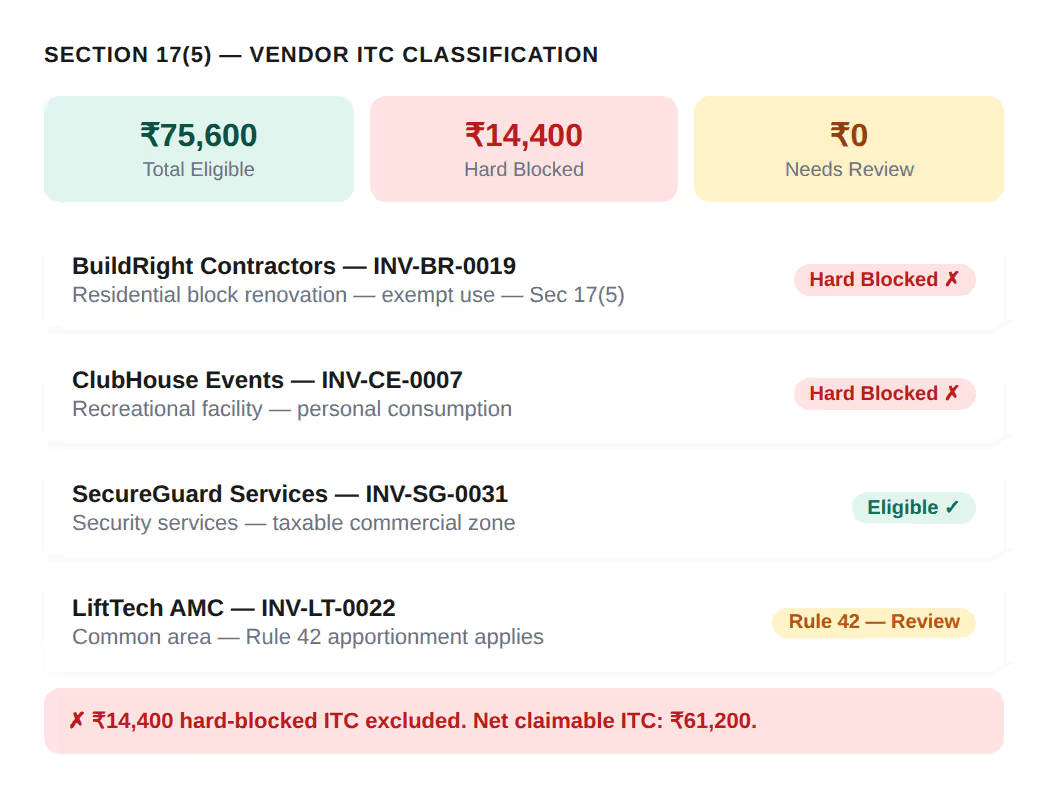
Mocha Manage's GSTR-2B report separates vendor ITC into the same two categories shown in the locked ITC summary screen. Hard-blocked credits under Section 17(5) are those where no exception is possible regardless of circumstances — works contract services for constructing or renovating immovable property that is used for exempt supply (such as a residential block renovation for a society with no taxable income from those units), recreational facility expenses, and goods or services for personal consumption. Needs-review credits are those where a Section 17(5) exception may apply depending on your specific situation — for example, works contract for plant and machinery within the property (eligible), or security services that specifically serve a commercial zone only. Hard-blocked credits are excluded from your net claimable ITC automatically. Needs-review credits are flagged for your CA or committee to confirm before filing.
Apply Rule 42 ITC Apportionment for Mixed-Use Properties — Computed Automatically Every Period
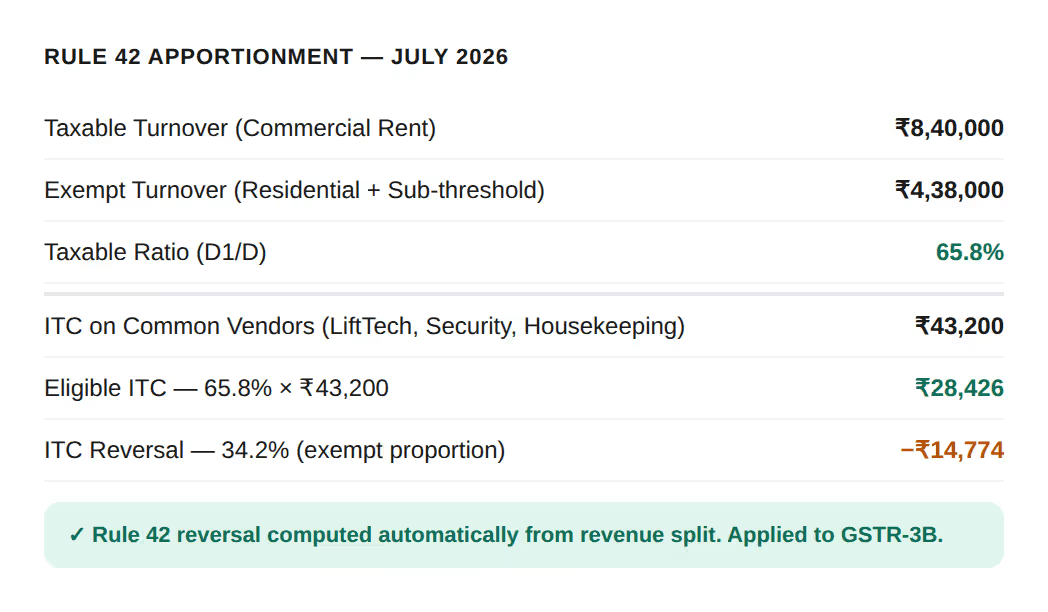
Properties with both taxable commercial income and exempt residential or sub-threshold maintenance income cannot claim the full ITC on common-area vendor bills. Rule 42 of the CGST Rules requires ITC on inputs used for both taxable and exempt supplies to be apportioned based on the ratio of taxable turnover to total turnover. Mocha Manage computes this ratio automatically from your revenue figures each period and applies it to each eligible common-area vendor invoice — so the ITC reversal in your GSTR-3B is always correctly calculated, without your CA needing to run a separate apportionment worksheet every month.
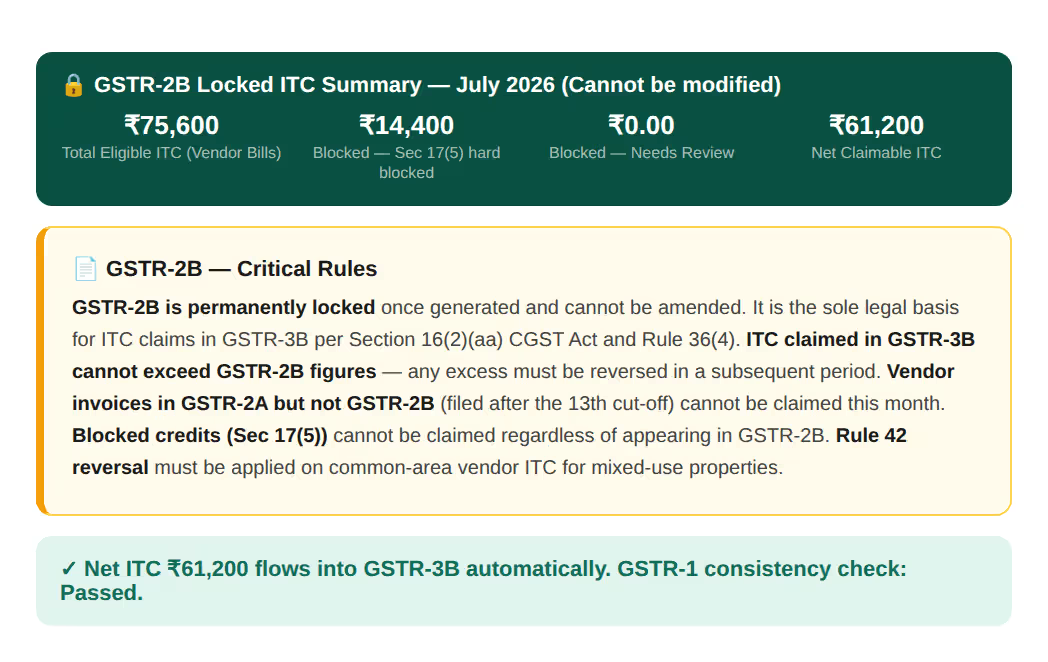
Locked ITC Summary and Critical Rules — Full Visibility for Your Committee Before Filing
Once your GSTR-2B reconciliation is complete in Mocha Manage, the locked ITC summary — exactly as shown in the final screen of the GSTR-2B report — provides your committee or management board with four critical figures: Total Eligible ITC from all vendor invoices in GSTR-2B, Blocked ITC hard-blocked under Section 17(5), Blocked ITC Needs Review requiring committee or CA sign-off, and Net Claimable ITC after all reversals and exclusions. This figure feeds directly into your GSTR-3B head-wise, with no manual transfer. The Critical Rules panel also ensures the committee understands the legal constraints before filing: ITC declared in GSTR-3B cannot exceed GSTR-2B figures, vendor invoices filed after the 13th cannot be claimed this month, and blocked credits remain ineligible regardless of whether they appear in GSTR-2B.
Powerful Built-In Integrations
Keep everything in sync, from filings to screenings, and manage everything in one place.

IRS
Simplified 1099 Filing

TransUnion
Smart Tenant Screening

Sure App
Renter's Insurance. Seamlessly Integrated.

CSG Forte
Secure Online Payments

Cashfree Payments
Seamless Online Payments

Mocha Signature
Optimize digital signing anytime.
IRS
Simplified 1099 Filing
TransUnion
Smart Tenant Screening
Sure App
Renter's Insurance. Seamlessly Integrated.
CSG Forte
Secure Online Payments
Cashfree Payments
Seamless Online Payments
Mocha Signature
Optimize digital signing anytime.
Why Choose Mocha Manage for GSTR-2B Reconciliation

Claim Every Eligible Rupee of Vendor ITC — Fully, Accurately, Every Month
Mocha Manage's five-way match ensures every eligible vendor invoice is confirmed, every deferred invoice is tracked to the correct future period, every partial match is flagged for review, and your committee's GSTR-3B ITC claim is complete.

Protect Your Society from ITC Recovery Notices
Mocha Manage identifies blocked credits and computes the Rule 42 reversal automatically so your GSTR-3B ITC reflects only what is legally claimable, with a documented audit trail for every decision.

One Workflow — Vendor Bill to GSTR-3B Filing, Nothing in Between
Every vendor bill recorded in Mocha Manage flows through the GSTR-2B reconciliation pipeline automatically. Five-way matching, Section 17(5) screening, Rule 42 apportionment, and GSTR-3B computation all happen within the same system.
Our Trusted Partners