GSTR-2A Reconciliation for Housing Societies & Property Managers — See the ITC Gap Before You File
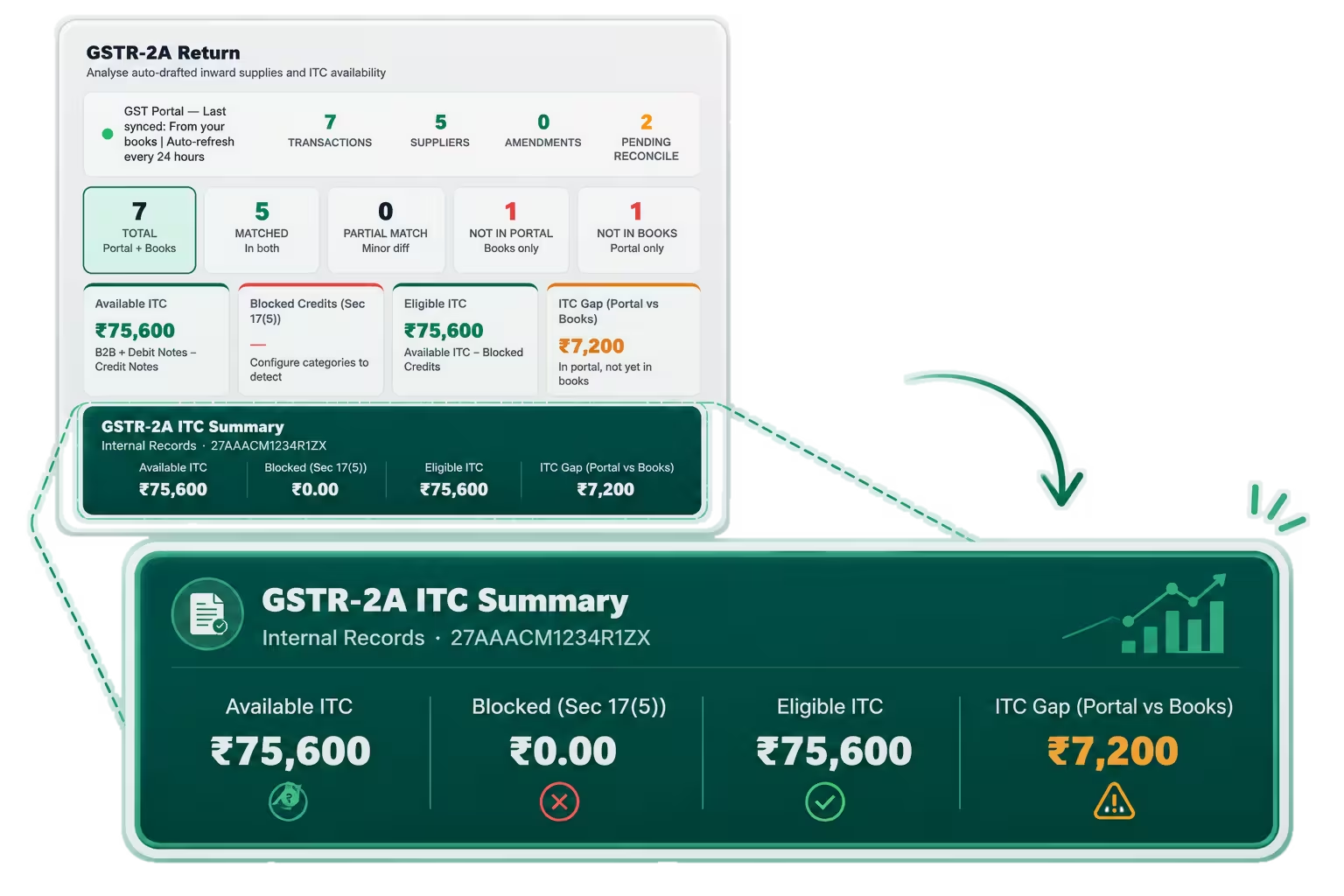
Mocha Manage matches the GSTR-2A against your vendor bills, shows Available ITC, Eligible ITC and the ITC Gap between portal and books, and surfaces Pending Reconcile alerts — so you can follow up with non-filing vendors before the GSTR-2B lock date and secure your ITC.

Shortlist 2024

Front Runners 2024

Category Leaders 2022

Leader Spring 2024

Users Love Us
We meet the highest security standards
Features of GSTR-2A Reconciliation in Mocha Manage
Download from GST Portal, Upload to Mocha Manage — Instant Match Against Your Vendor Bills
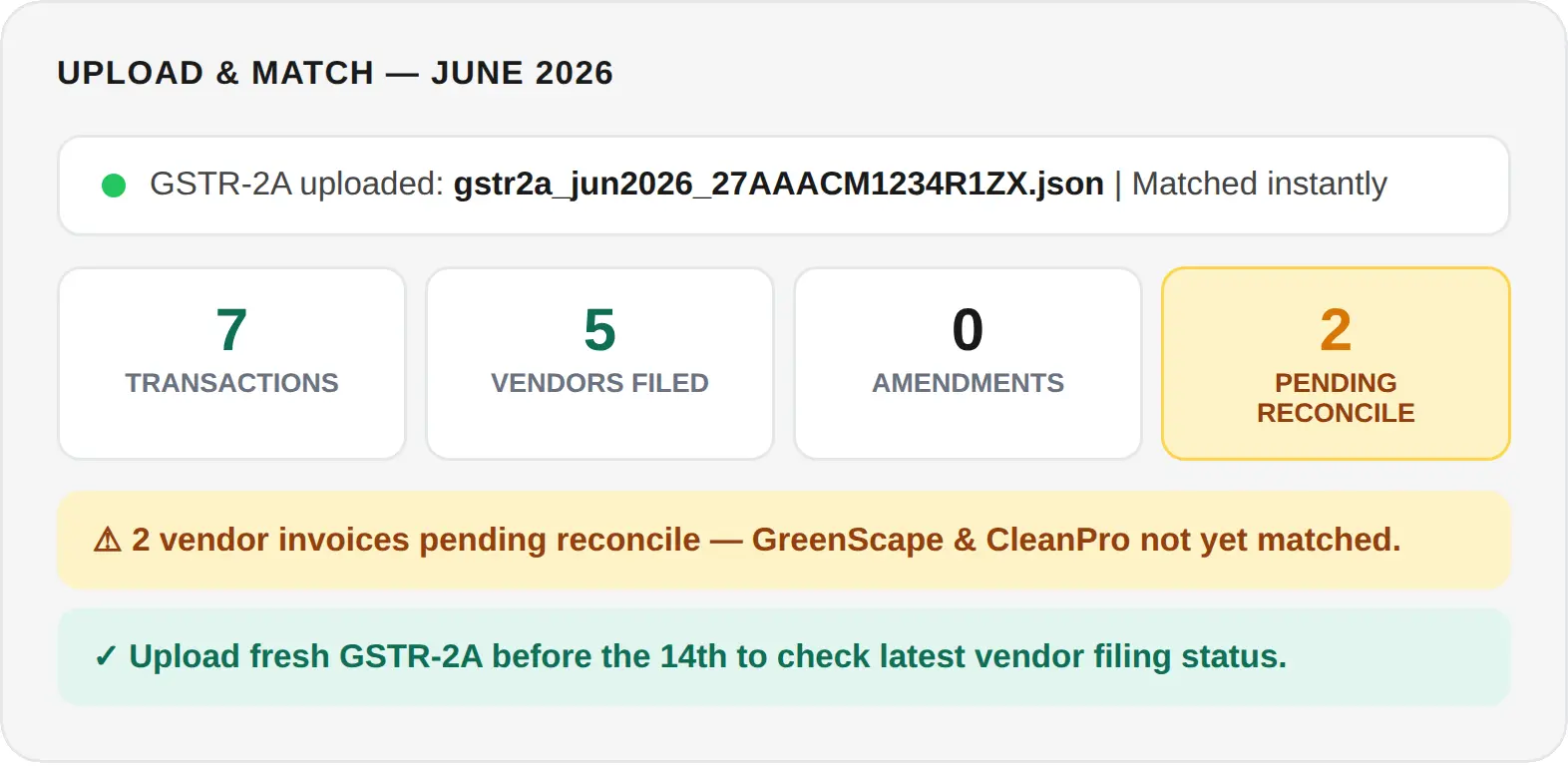
To reconcile GSTR-2A in Mocha Manage, download your GSTR-2A JSON file from the GST portal and upload it directly into the report. Mocha Manage immediately reads the file and matches every reflected vendor invoice against your vendor bill register — showing you Transaction count, Vendors Filed, Amendments, and Pending Reconcile in four counters at the top of the report. A non-zero Pending Reconcile count means there are vendor invoices in your GSTR-2A that have not yet been matched to a bill in your records — either the vendor has filed but you have not recorded the bill, or there is a discrepancy to investigate. Since GSTR-2B locks on the 14th, uploading and reviewing your GSTR-2A before that date gives you time to act.
Available ITC, Eligible ITC and ITC Gap — Your Complete Vendor ITC Picture in Four Tiles
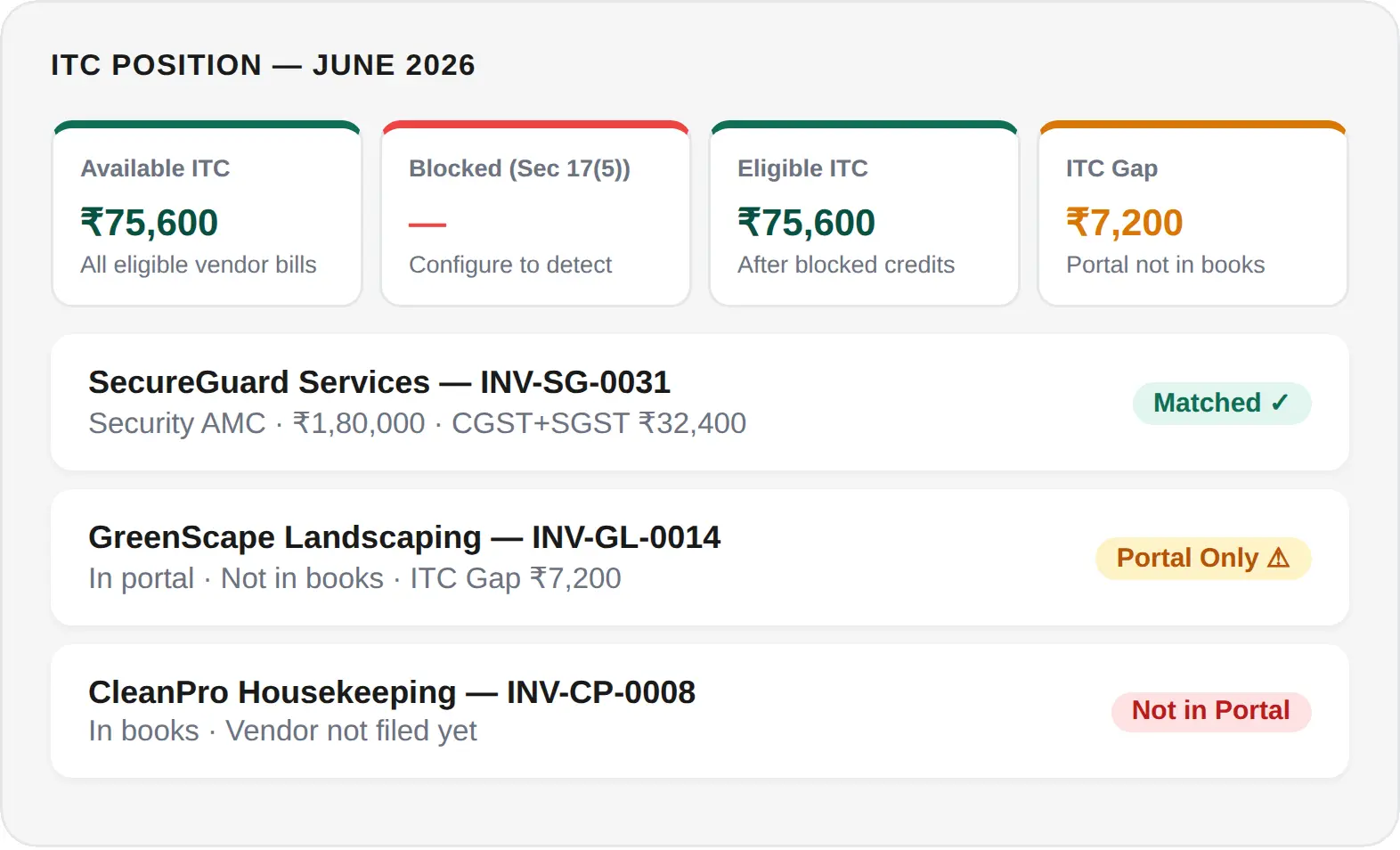
The four ITC tiles give an instant picture of your vendor ITC position. Available ITC is the total GST on all eligible B2B vendor invoices in GSTR-2A net of credit notes. Blocked Credits (Section 17(5)) are deducted once you configure your expense categories — flagging ineligible AMC or construction contracts automatically. Eligible ITC is the net claimable figure. The ITC Gap (Portal vs Books) is the most actionable tile — it shows vendor invoices filed in GSTR-2A that have not yet been entered in your vendor register. Closing this gap by recording the missing bills is the last step before your GSTR-2B reconciliation is complete.
Parts A Through D — Vendor Bills, ISD Credits, TDS/TCS and Import Goods All in One Report
GSTR-2A is structured across four parts. Part A — the most relevant for property management — covers B2B invoices from all GST-registered vendors (security agencies, AMC contractors, housekeeping, landscaping), amendments, credit and debit notes, and ECO supplies. Part B covers ISD credits if your group distributes common input credits across multiple properties. Part C covers TDS and TCS credits. Part D covers Import of Goods for properties importing equipment. Each part shows IGST, CGST, SGST and Cess breakdowns with a total ITC figure per section.
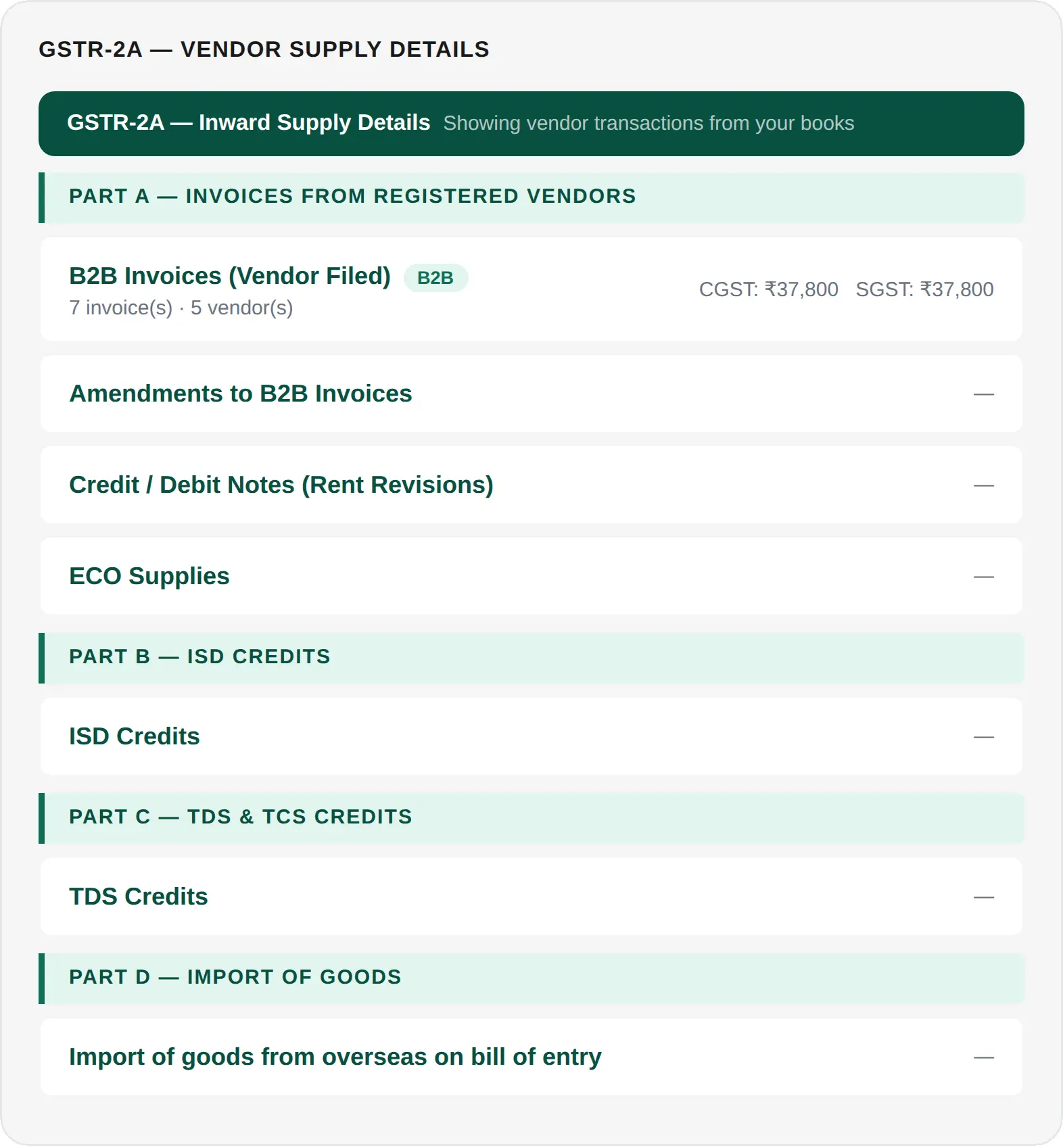
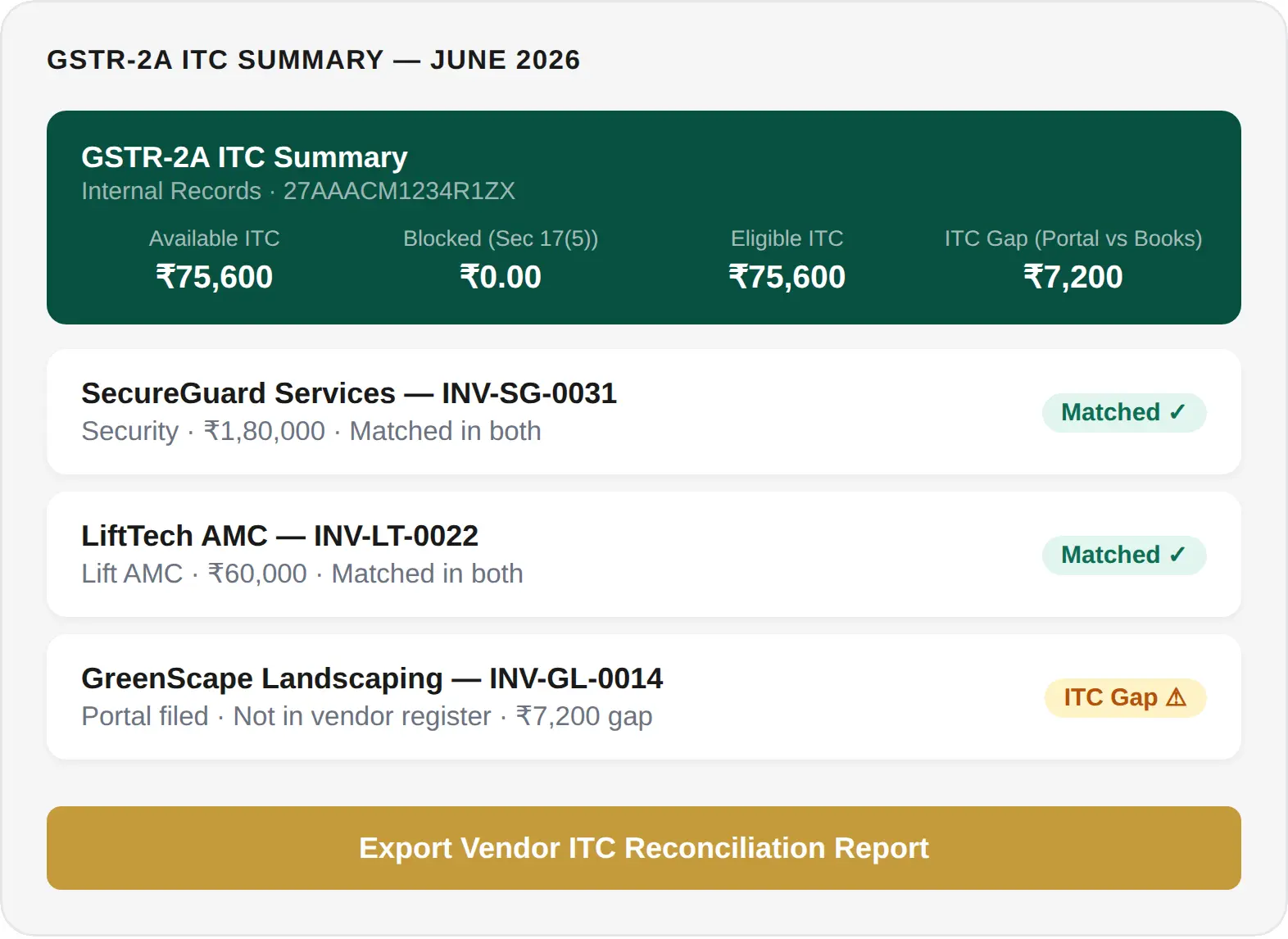
GSTR-2A ITC Summary Bar — Vendor ITC Position Updated Live Throughout the Month
The GSTR-2A ITC Summary bar at the foot of the report gives your committee or CA a live single-line view of the property's vendor ITC position at any point in the month — Available ITC, Blocked Credits (Section 17(5)), Eligible ITC, and ITC Gap (Portal vs Books). The ITC Gap is the most critical figure: it is the value of vendor invoices filed in GSTR-2A that your accounts team has not yet recorded. Recording these missing bills closes the gap and completes your vendor register — the final step before your GSTR-2B reconciliation and GSTR-3B ITC claim can be finalised.
Powerful Built-In Integrations
Keep everything in sync, from filings to screenings, and manage everything in one place.

IRS
Simplified 1099 Filing

TransUnion
Smart Tenant Screening

Sure App
Renter's Insurance. Seamlessly Integrated.

CSG Forte
Secure Online Payments

Cashfree Payments
Seamless Online Payments

Mocha Signature
Optimize digital signing anytime.
IRS
Simplified 1099 Filing
TransUnion
Smart Tenant Screening
Sure App
Renter's Insurance. Seamlessly Integrated.
CSG Forte
Secure Online Payments
Cashfree Payments
Seamless Online Payments
Mocha Signature
Optimize digital signing anytime.
Why Choose Mocha Manage for GSTR-2A Reconciliation

Act Before the Lock Date — Pending Reconcile Alerts Tell You Exactly Where
GSTR-2B locks on the 14th. GSTR-2A updates every 24 hours and shows you the same vendor filing information while there is still time to act. The Pending Reconcile counter surfaces every unmatched invoice so your committee knows exactly which vendor bills need attention — without manually comparing a spreadsheet against a portal download.

The ITC Gap Shows You What the Portal Knows That Your Books Don't
The ITC Gap (Portal vs Books) is a live figure showing vendor invoices filed against your GSTIN in GSTR-2A that have not yet been entered in your vendor bill register. For a housing society, this often means a vendor has filed their GSTR-1 for work already completed, but the corresponding bill has not yet been processed by your accounts team. Mocha Manage surfaces this gap automatically so no eligible ITC is missed.

STR-2A Monitoring Flows into GSTR-2B Reconciliation — No Re-Work
In Mocha Manage, GSTR-2A monitoring and GSTR-2B reconciliation are the same workflow — not two separate processes. Match status, ITC gap closures, and pending reconcile resolutions from the GSTR-2A phase carry forward when GSTR-2B is generated on the 14th. Your GSTR-2B reconciliation starts from the position your GSTR-2A monitoring reached, not from a blank reconciliation sheet.
Our Trusted Partners