
Shortlist 2024

Front Runners 2024

Category Leaders 2022

Leader Spring 2024

Users Love Us

We meet the highest security standards
Features of GSTR-1 Filing in Mocha Manage
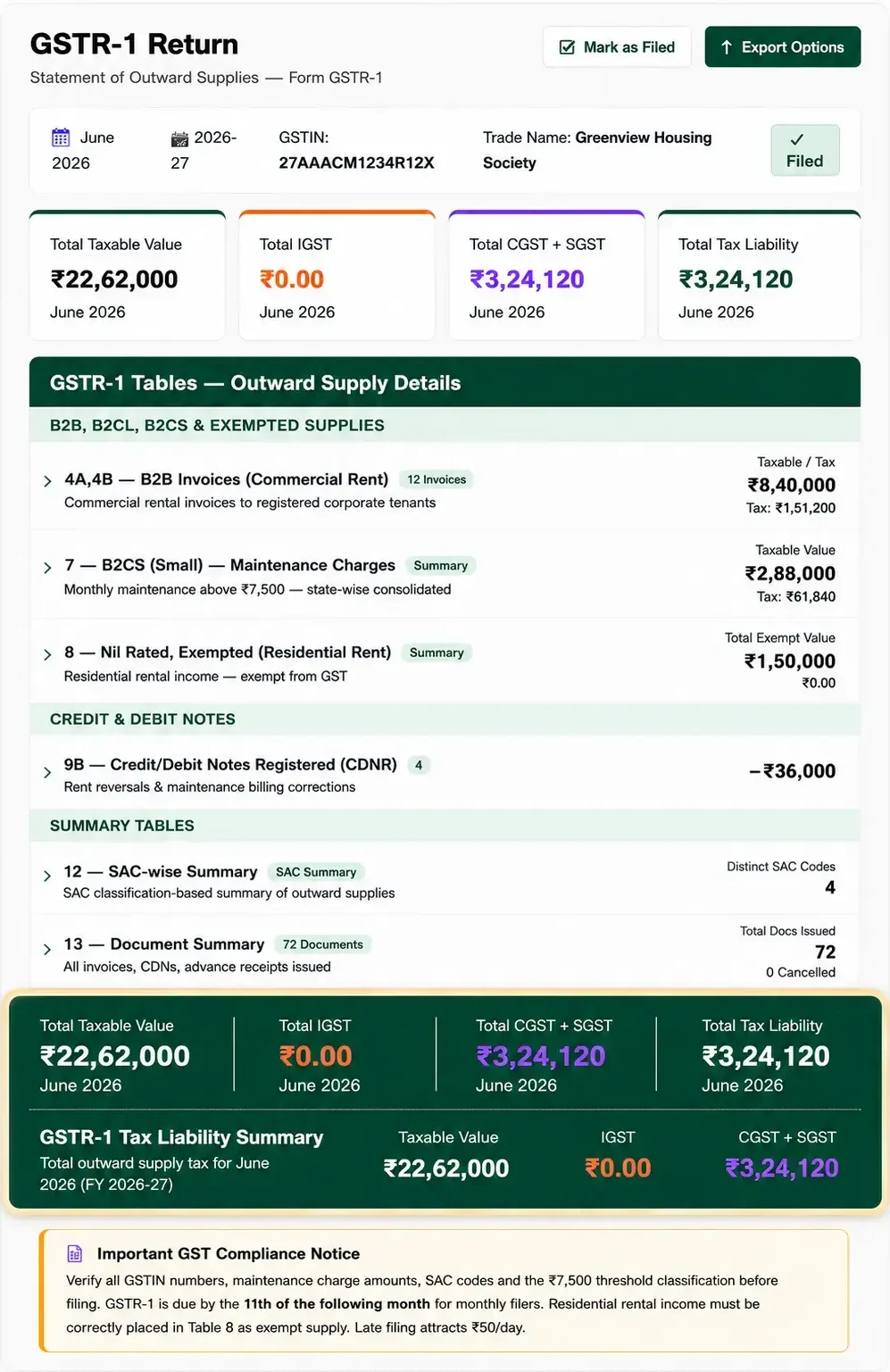
Auto-Classify Maintenance Charges, Commercial Rent and Facility Invoices into the Correct GSTR-1 Tables
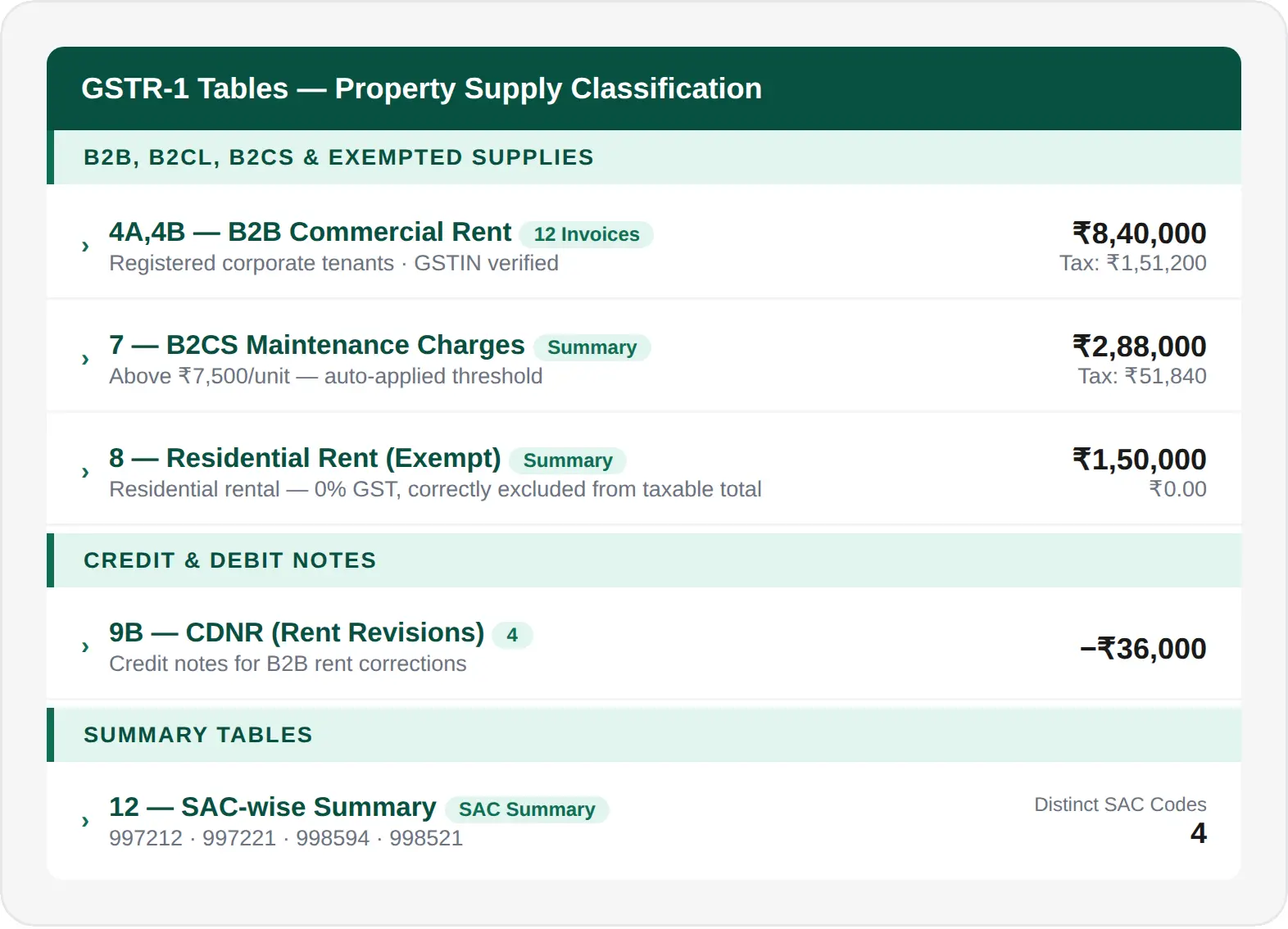
Property management generates a unique mix of supply types — commercial rental invoices to registered corporate tenants in Table 4A/4B, maintenance charges above ₹7,500 per unit consolidated state-wise in Table 7, residential rental income placed correctly in Table 8 as an exempt supply, and facility fees or large B2C charges in Table 5. Mocha Manage reads the supply type, recipient GSTIN, invoice value and place of supply from each transaction and assigns it to the correct table automatically — with residential rental excluded from taxable totals and sub-threshold maintenance correctly placed as exempt.
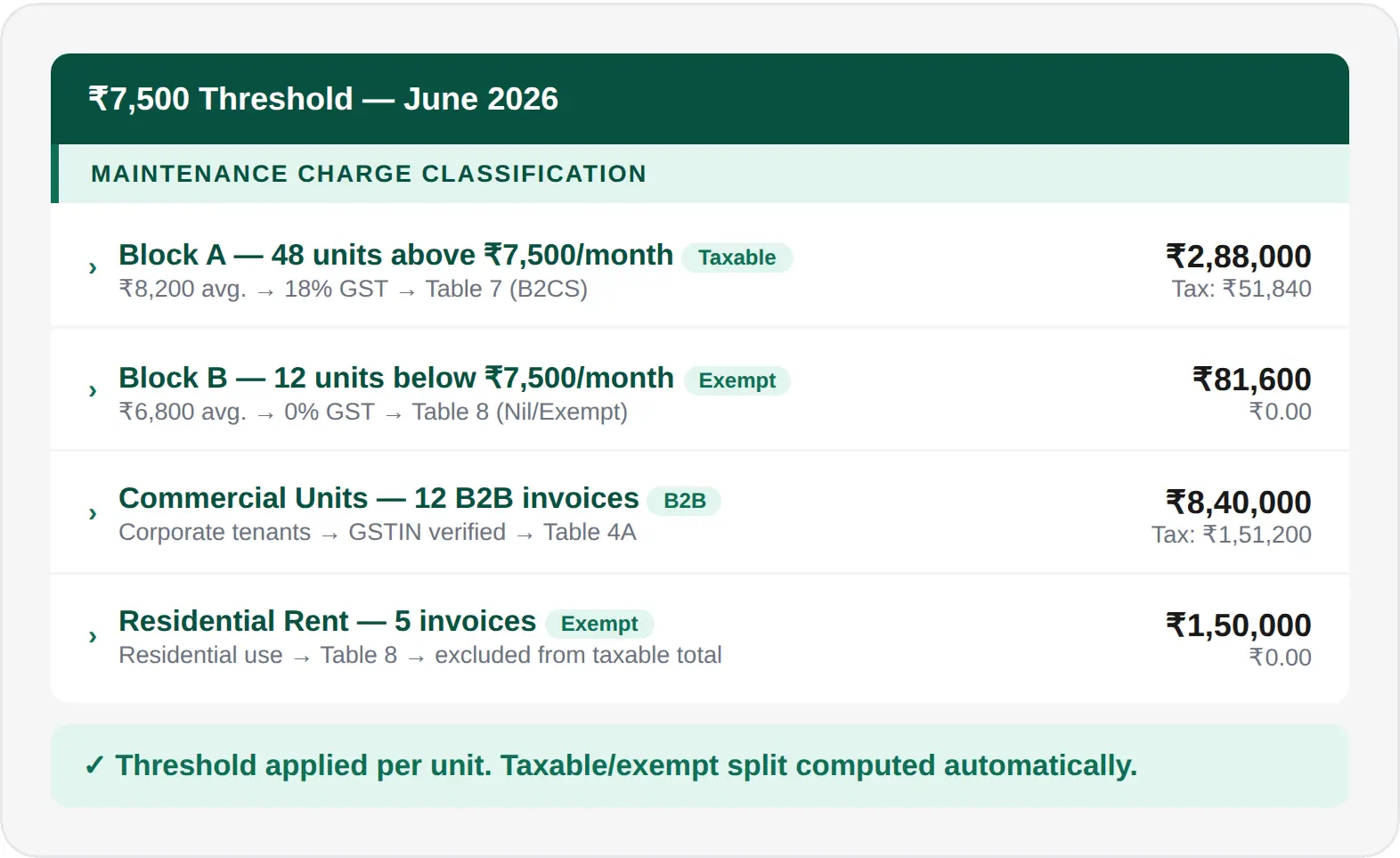
Apply the ₹7,500 Maintenance Threshold Automatically — Taxable vs Exempt Split Done for Every Unit
The most common GSTR-1 error for housing societies is misclassifying maintenance charges — either missing the GST obligation on units above ₹7,500 or incorrectly taxing charges below the threshold. Mocha Manage tracks per-unit monthly maintenance charges, applies GST at 18% only where the threshold is crossed, and correctly places taxable maintenance in Table 7 and exempt maintenance in Table 8. Your GSTR-1 outward supply totals always reflect the correct taxable/exempt split — with no manual unit-by-unit analysis required each month.
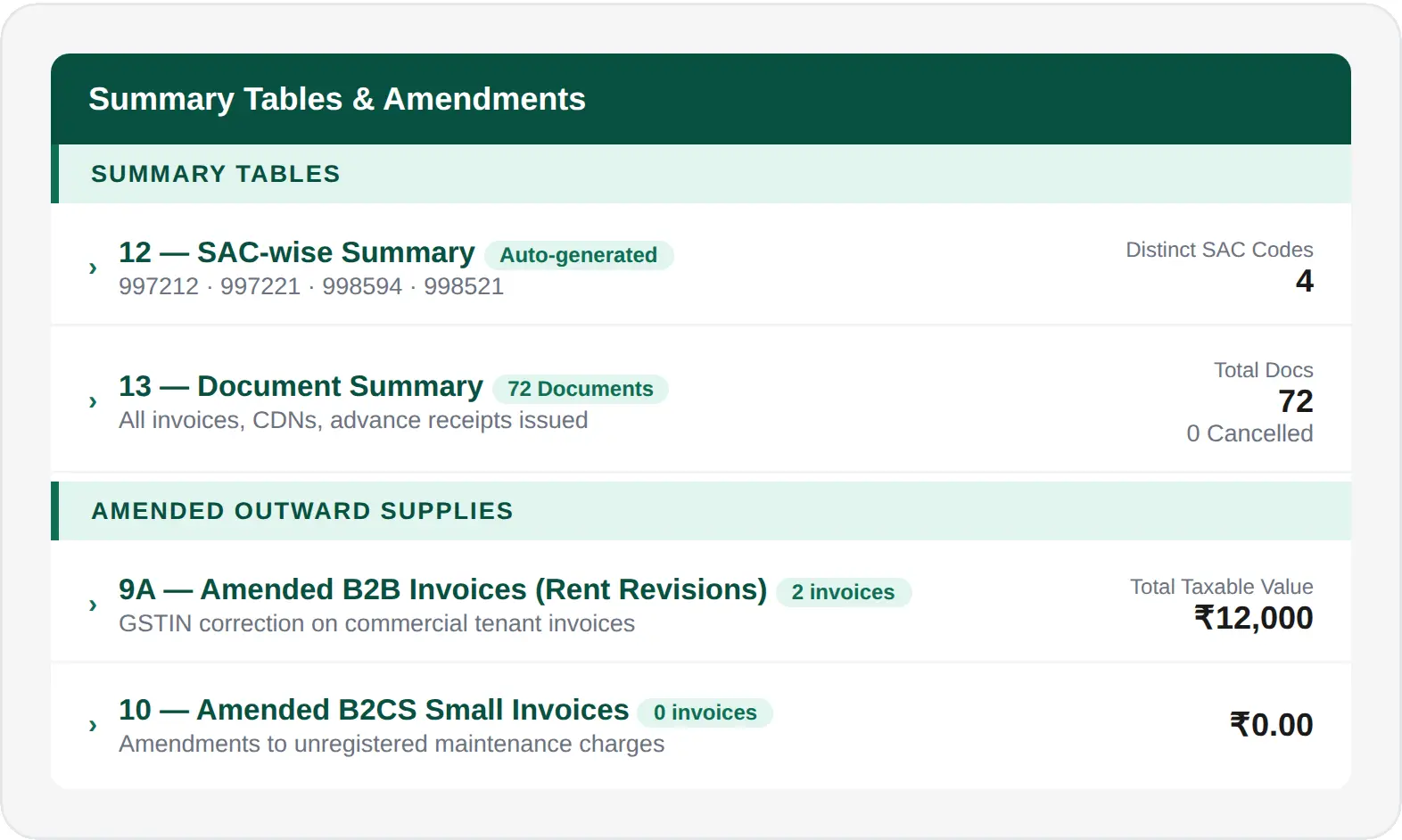
SAC-wise Summary, Document Summary and Amendments — All Tables Generated Automatically
Beyond the main invoice tables, GSTR-1 requires a SAC-wise summary in Table 12 — listing every service code used, total taxable value and tax amount. Mocha Manage auto-generates this from your invoice line items across all property service types: commercial rental (SAC 997212), property management fees (SAC 997221), facility management (SAC 998594) and security services (SAC 998521). Table 13 generates the document summary — a full count of invoices, credit notes, debit notes and advance receipts issued. Amendments to previously filed invoices — rent revisions, GSTIN corrections — are placed in the correct amendment tables (9A/10) automatically with the original invoice period linked.
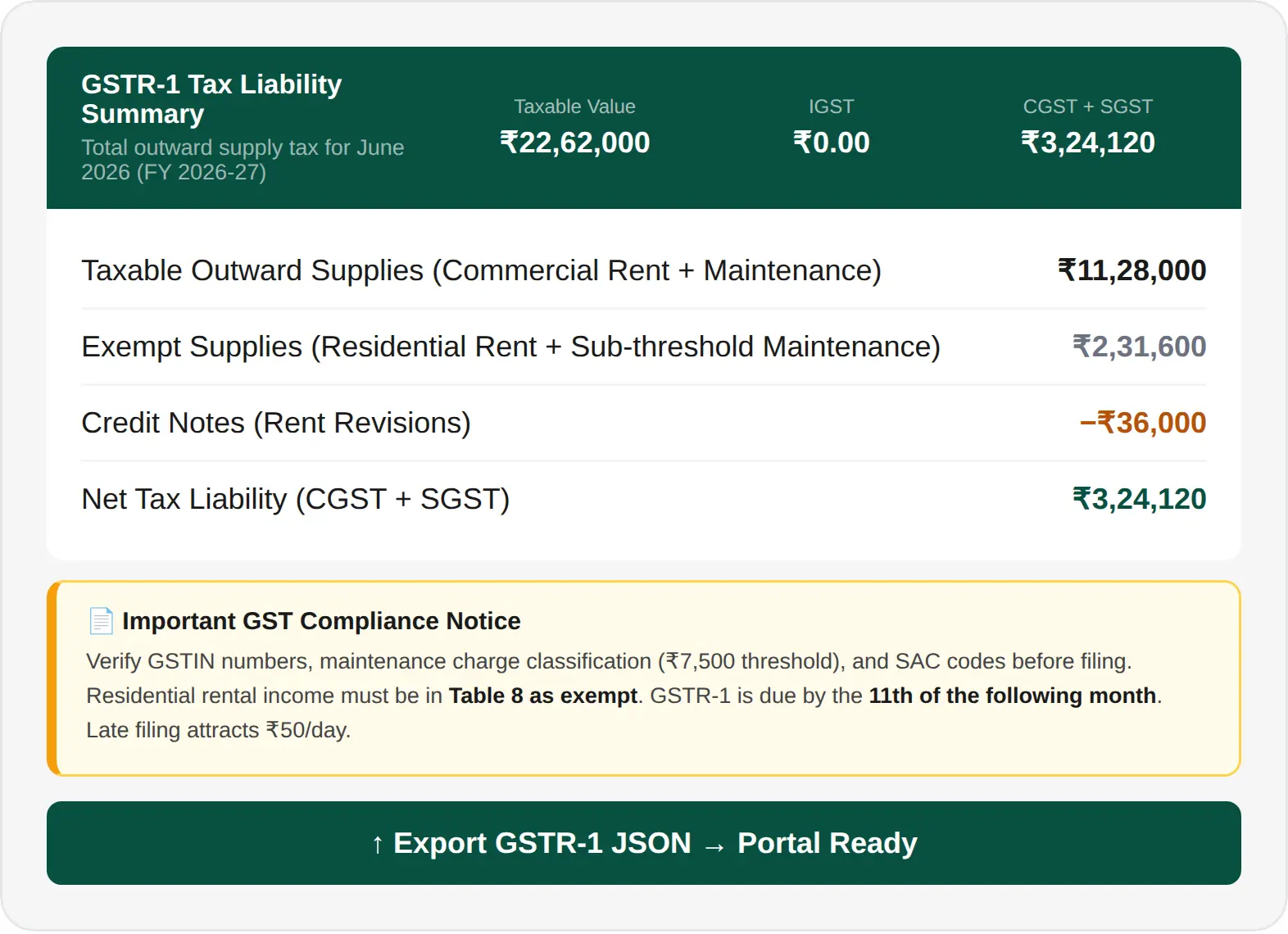
Tax Liability Summary, Compliance Notice and Portal-Ready Export — One Report, One Click
Once all tables are compiled, Mocha Manage generates the GSTR-1 Tax Liability Summary — Taxable Value, IGST, CGST + SGST and Total Tax Liability — matching the exact portal report format. An in-system compliance notice tailored for property managers flags the due date, overdue status, the ₹7,500 threshold check, and the requirement to correctly place residential rental income as exempt in Table 8. When everything is verified, a single click exports the GSTN-compliant JSON for direct portal upload — with no manual reformatting required.
Powerful Built-In Integrations
Keep everything in sync, from filings to screenings, and manage everything in one place.

IRS
Simplified 1099 Filing

TransUnion
Smart Tenant Screening

Sure App
Renter's Insurance. Seamlessly Integrated.

CSG Forte
Secure Online Payments

Cashfree Payments
Seamless Online Payments

Mocha Signature
Optimize digital signing anytime.
IRS
Simplified 1099 Filing
TransUnion
Smart Tenant Screening
Sure App
Renter's Insurance. Seamlessly Integrated.
CSG Forte
Secure Online Payments
Cashfree Payments
Seamless Online Payments
Mocha Signature
Optimize digital signing anytime.
Why Choose Mocha Manage for GSTR-1 Filing

Property-Specific GST Rules Applied Automatically
The ₹7,500 maintenance threshold, residential rental exemption, correct SAC codes for each service type, and commercial tenant GSTIN verification — Mocha Manage applies all of these at the transaction level. There is no manual analysis of which invoices are taxable, which are exempt, and which table each belongs in.

Your Property Billing Records Are Your GSTR-1
Every maintenance invoice, commercial rental bill, facility fee and credit note you record in Mocha Manage feeds your GSTR-1 automatically. There is no separate compliance workflow, no data to re-enter, and no risk of your return diverging from the billing records your committee or management board reviews each month.

GSTR-1 Data Flows into GSTR-3B — Consistency Checked Before Filing
Outward supply totals from your GSTR-1 feed directly into your GSTR-3B computation. Before you export GSTR-3B, the system cross-checks its outward supply figures against your GSTR-1 — so discrepancies are resolved before filing, not discovered when the portal detects the mismatch.
Our Trusted Partners