







Smart Visitor Management to Know Every Visitor, At Any Property
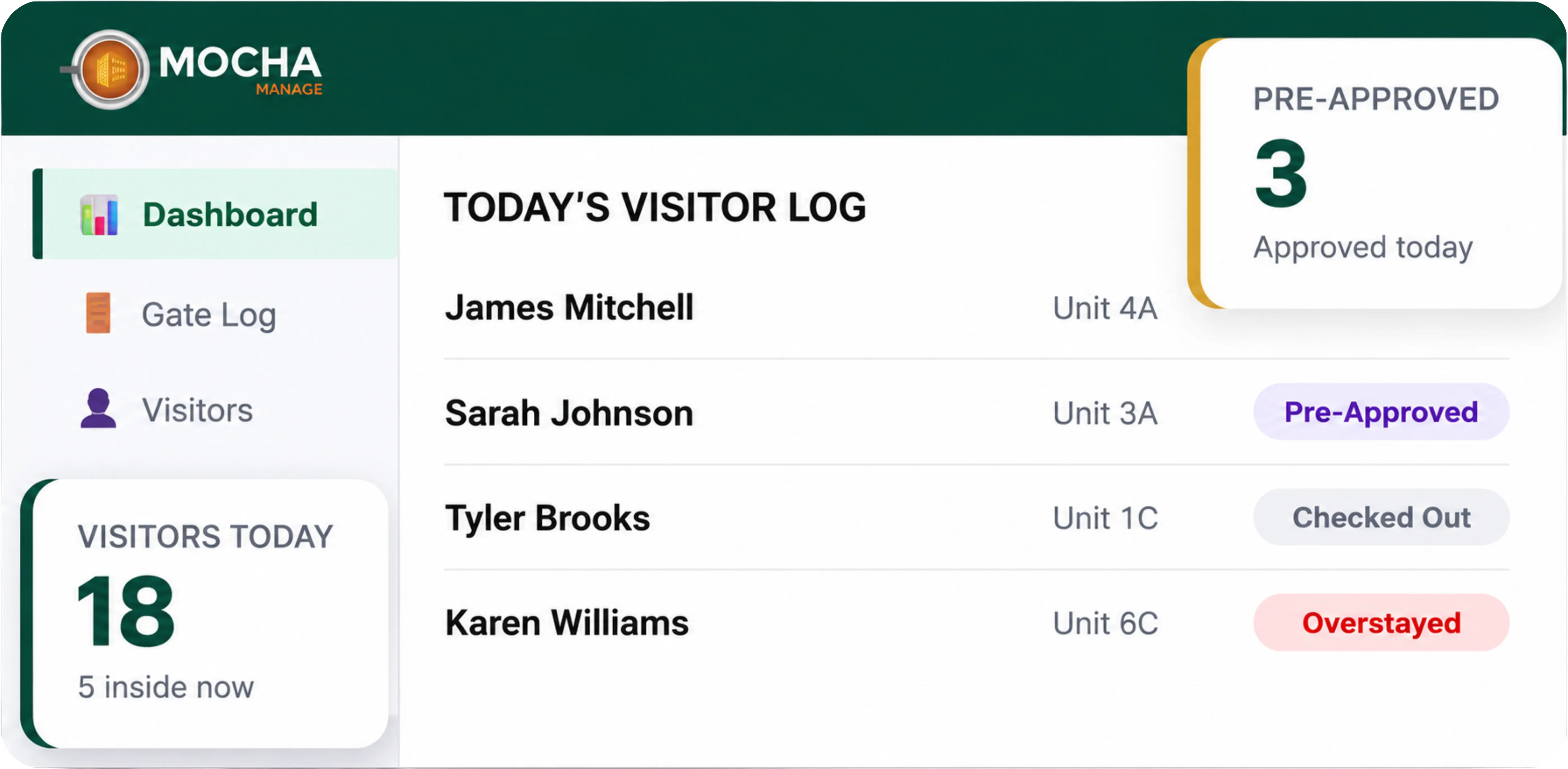
Give your security team a tool they can actually use. Mocha Manage digitises every visitor movement — from pre-registration and gate pass generation to photo capture, overstay alerts, and complete audit-ready logs — all from a single screen that any guard can operate in seconds.

Shortlist 2024

Front Runners 2024

Category Leaders 2022
Leader Spring 2024
Users Love Us
We meet the highest security standards
What is Visitor Management Software?
Visitor Management Software is designed to help property managers, security teams, residents and administrators track every person entering and exiting a premises. It replaces paper gate registers with a digital system that logs visitor details, captures photos, generates gate passes and maintains a searchable audit trail. With Mocha Manage, visitor management becomes faster, more transparent and easier to oversee — reducing security gaps, eliminating manual record-keeping and giving you complete visibility over who is on the premises at any time.
Features of Visitor Management Software
Visitor Entry & Exit Logging — Fast, Simple Gate Management for Any Property
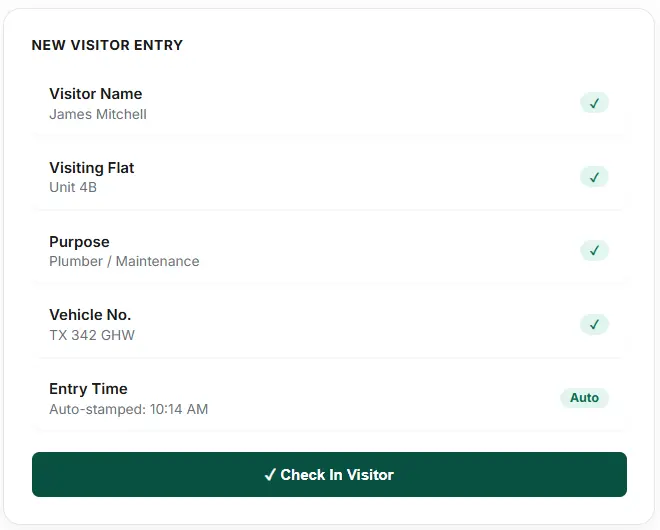
A visitor management system is only as effective as the guards who use it. Mocha Manage's interface is designed for simplicity first — minimal fields, large buttons and a clear screen that works on any phone, tablet or shared device. A guard can log a visitor's name, unit number, purpose and vehicle number in under 15 seconds. Check-in and check-out are single taps. No paper register to maintain and no end-of-shift backlog to catch up on.
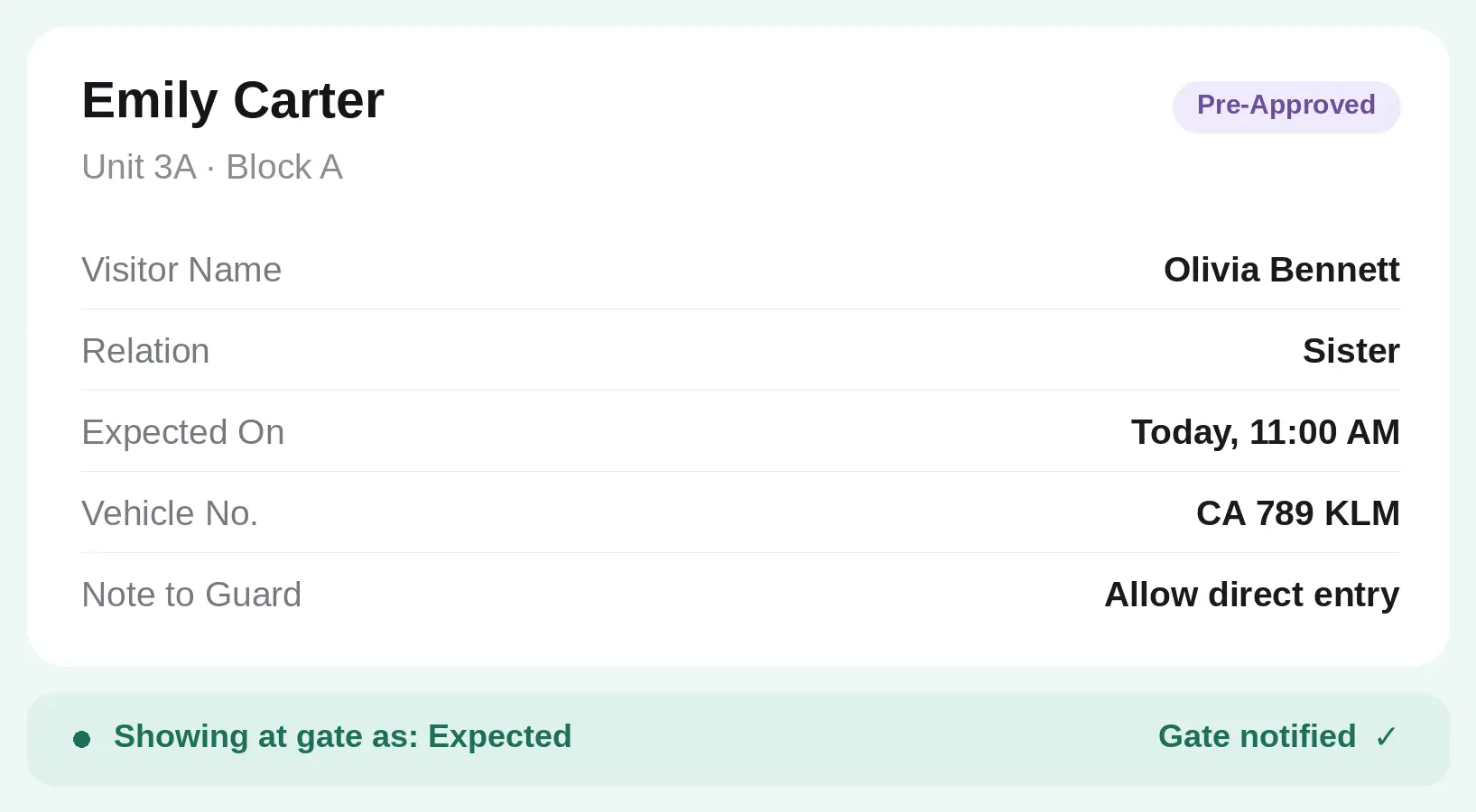
Visitor Pre-Approval — Let Residents Invite Guests So The Gate Is Always Expecting Them
When a resident is expecting a guest, a delivery or a service professional, they can pre-approve the visitor from their mobile app before the person arrives. The guard sees the visitor as "pre-approved" in the visitor log — with the resident's name, unit number and any notes already filled in. When the visitor arrives and confirms their identity, check-in is a single tap. No additional approvals or phone calls to residents from the gate. No hold-ups at peak hours.
Resident AppGenerate Digital Gate Passes with QR Codes — Valid, Scannable and Time-Bound
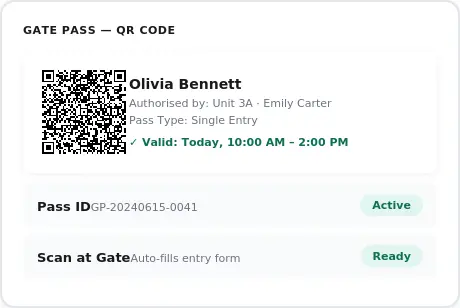
For planned visits — events, contractors, recurring service staff — Mocha Manage generates a digital gate pass with a unique QR code that the resident can share with their guest in advance. The guard scans the QR code at the gate to instantly pull up the visitor's details, the authorising resident and the valid entry window. No manual lookups. No calls to verify.
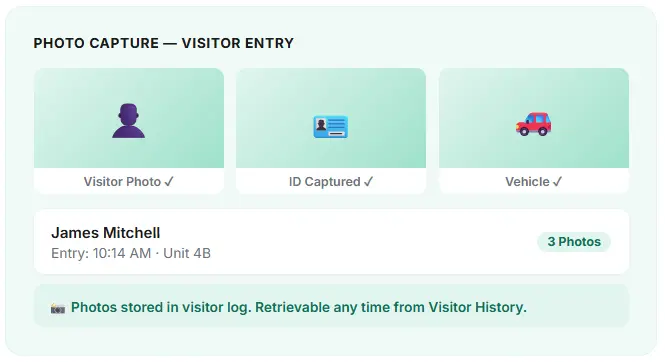
Capture Visitor Photos at Entry — Know Exactly Who Walked Through Your Gate
Every visitor entry in Mocha Manage can include a photo captured at the gate from the device camera. The photo is stored against the visitor's log entry and is instantly retrievable from the visitor history. For the resident, guard and property manager, this means every entry record has a face attached to it — not just a name. In the event of an incident or a disputed entry, the photo evidence is part of the audit trail, timestamped and tied to the unit that authorised the visit.
Overstay Alerts — Automated Notifications When Visitors Exceed Their Time
When a visitor has been inside the premises beyond the configured time threshold — the system flags the entry as an overstay and notifies the security guard and the resident. The alert shows the visitor's name, the unit they are visiting and how long they have been inside. The guard can then verify with the resident and request an extension, keeping complete oversight without requiring manual monitoring of the gate register.
Resident Notifications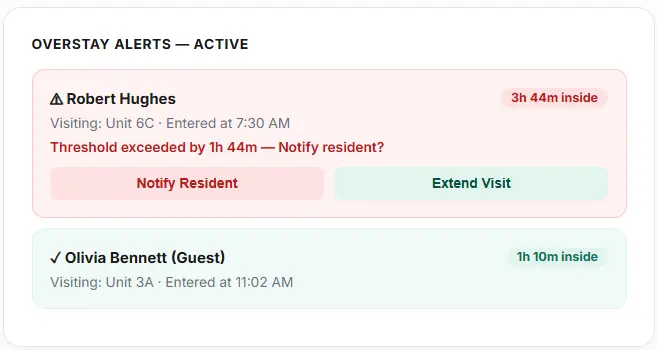
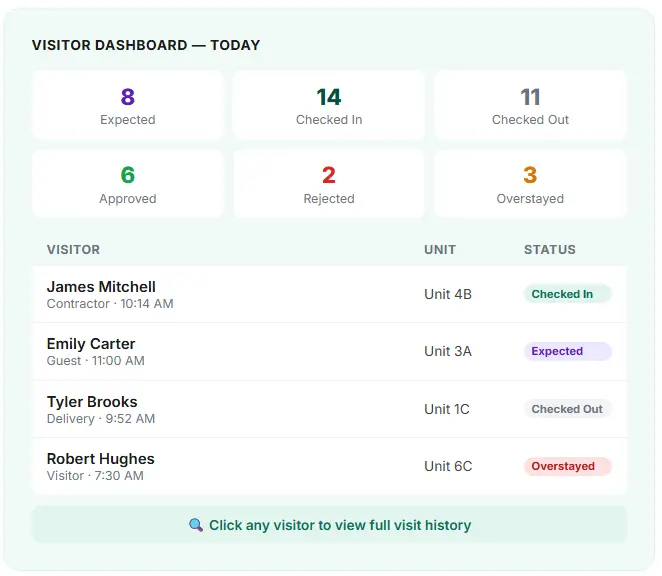
Real-Time Visitor Dashboard — Track Live Status, KPIs and Complete Visitor History
Stop asking your guard what happened at the gate yesterday. Mocha Manage's real-time dashboard puts every visitor status — expected, approved, rejected, checked-in, checked-out and overstayed — in one view, updated live. The KPI cards provide an instant count for each status across any time period. And when you need to dig deeper, clicking on any visitor pulls their full visit history — every entry they have ever made to your premises, with timestamps, unit details and photos attached.
Powerful Built-In Integrations
Keep everything in sync, from filings to screenings, and manage everything in one place.

IRS
Simplified 1099 Filing

TransUnion
Smart Tenant Screening

Sure App
Renter's Insurance. Seamlessly Integrated.

CSG Forte
Secure Online Payments

Cashfree Payments
Seamless Online Payments

Mocha Signature
Optimize digital signing anytime.
IRS
Simplified 1099 Filing
TransUnion
Smart Tenant Screening
Sure App
Renter's Insurance. Seamlessly Integrated.
CSG Forte
Secure Online Payments
Cashfree Payments
Seamless Online Payments
Mocha Signature
Optimize digital signing anytime.
Why Choose Mocha Manage for Visitor Management?

Simple and Easy to Use
Most visitor management systems fail at the gate because they are too complex for security personnel. Mocha Manage's interface is designed for the guard first — large tap targets, minimal data entry, and a clear screen that works on any device. Check-in takes under 15 seconds with no training required.

Highly Secured Platform
Rest assured that your visitor data, gate pass records, and entry logs are stored on a highly secure platform. Every photo, timestamp, and audit trail entry is protected and accessible only to authorised personnel — giving your committee and property manager complete peace of mind.

All-in-one Solution
Mocha Manage connects every stakeholder in the visitor workflow — residents pre-approve guests, guards log entries at the gate, and management monitors the dashboard in real time. One platform replaces paper registers, phone calls, and disconnected spreadsheets entirely.
Our Trusted Partners


Explore Other Features
Frequently Asked Questions
Didn't find your answer?
Book a quick 30-minute call with a product expert and get answers tailored to your needs.
Talk to a Product ExpertVisitor Management Software is a digital system that replaces paper gate registers. It logs every person entering and exiting a premises, captures visitor details and photos, generates gate passes, sends overstay alerts, and maintains a complete searchable audit trail all from a single platform accessible by guards, residents and property managers.
It digitises the entire visitor lifecycle from a resident pre-approving a guest before they arrive, to a guard logging entry at the gate in seconds, to the property manager monitoring live visitor status on a dashboard. It also generates QR code gate passes, captures visitor photos, flags overstays automatically, and stores every entry permanently for audit purposes.
Mocha Manage's Visitor Management is built for housing societies, RWAs, gated communities, HOAs, commercial complexes and residential properties of any size. Security guards, residents, society committees and property managers each have their own role-specific view within the same platform.
Mocha Manage's Visitor Management replaces your paper gate register with a live digital log. Guards check visitors in under 15 seconds. Residents pre-approve guests from their mobile app. Committees get real-time visibility over who is on the premises. It is useful for any property that wants to replace manual gate monitoring with a secure, auditable, and easy-to-use digital system.
The guard opens the interface on any phone, tablet or shared device, enters the visitor's name, unit number and purpose and taps Request Approval. For pre-approved visitors, the guard just taps check-in and checks in the visitor. The entry is timestamped automatically. The entire process takes under 15 seconds and requires no training.
Pre-registration allows residents to add expected visitors guests, deliveries or service professionals through the Mocha Manage mobile app before they arrive. When the visitor reaches the gate, the guard sees them listed as "Pre-Approved" with all details already filled in. Check-in is a single tap, with no phone calls or manual lookups needed.
Residents can generate a digital gate pass with a unique QR code for planned visits such as events, contractors or recurring service staff. The pass has a configurable validity window and can be set as single-use or multi-use. The guard scans the QR code at the gate to instantly pull up the visitor's details and authorised entry window.
Yes. Every visitor entry can include a photo captured at the gate from the device camera. The photo is stored against the visitor's log entry and is permanently retrievable from visitor history, providing a visual identity record tied to every entry.
When a visitor remains on the premises beyond the configured time threshold, the system automatically flags the entry as an overstay and notifies the security guard and the resident. The alert shows the visitor's name, the unit they are visiting, and how long they have been inside. The guard can then verify with the resident or log an extension.
The dashboard displays every visitor's live status such as Expected, Approved, Rejected, Checked-In, Checked-Out and Overstayed for today, this week or this month. KPI cards at the top give an instant count per status. Clicking on any visitor pulls up their full visit history, including all previous entries, timestamps, unit details and photos.
The software employs encryption and secure protocols to safeguard your data. As Mocha Manage is a cloud-based solution utilizing AWS, one of the foremost providers of secure cloud services, you can be assured that your data is secure and inaccessible to any third party without appropriate authentication.
You can establish multiple user roles with specific permissions for landlords, property managers, tenants, and applicants. Additionally, it is possible to include your accountant and property agents, defining their access rights. You retain the ability to revoke access at any time, ensuring complete control over user permissions.
The software maintains detailed logs of all transactions, communications, and system changes for audit purposes.
The software is designed for exceptional scalability, capable of supporting thousands of units, properties, and tenants without sacrificing performance. As your business expands, Mocha Manage accommodates more complex tasks by providing additional features. Our pricing structure is tiered according to features and usage. We offer various plans to suit the diverse requirements of businesses. Detailed pricing information is available on our website.
Mocha Manage offers a free version with no trial period or commitments.
Upon registration, our Onboarding Specialists will guide you through the functionalities of Mocha Manage. After your setup is complete, we remain available to address any questions you may have to ensure seamless operation for your business needs. We are dedicated to supporting your success and growth. Our customer support team is readily accessible for inquiries and product demonstrations. Support channels include email, phone, chat support, and knowledge base articles. For further information, please visit our Contact Us page.


